I rarely do reviews of individual sites here on this blog, but I wanted to make an exception for Gyminee. I made a commitment to getting back in shape about 3 months ago, and I have been inconsistent at best at tracking my progress until Todd recently found Gyminee. I really liked the idea of being able to track my workouts / nutrition, but I was even more excited to find that I had several friends in Portland already using Gyminee. I committed to using Gyminee diligently for one week to see how I liked it, and a couple of people asked me to do a quick review of it after a week, so here we go!
Gyminee has a freemium business model. You can make great use of the service for free, but they also offer pro accounts for people who want a few extra features (similar to the Flickr model). You get to set your own goals (weight loss, resting heart rate, arm size, etc.) and track your progress toward meeting the goals. You can track every workout and everything you eat in Gyminee, and it calculates calories in vs. calories out along with a bunch of other measurements in a daily dashboard.
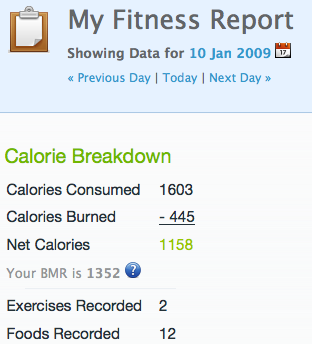
You can also set up custom workouts and favorite foods to make it easy to record your workouts and add foods that you eat regularly. I’ve also heard that the iPhone app for Gyminee is outstanding and makes it easy to track while on the go. One interesting feature is the add a new recipe where you can enter in your recipes, and it will calculate the nutritional properties (calories, protein, etc.) for you. I was talking a couple of people today, and we were talking about how you could use the recipe feature to record common meals to make them even easier to record. For example, you could create a favorite breakfast “recipe” containing a cup of cereal, a half cup of soymilk, and a banana that you could add as one meal.
While the tracking features are great, the real reason I’m covering it here on this blog is because of the social networking features. You can add your friends and track their workouts and progress to encourage each other to meet goals or create friendly competitions among friends. Anyone can create or join a group, Stumptown Stompers, for example, and they have forums for just about any topic. Users add the foods they eat, and other users can access those same foods, so after one person enters your favorite brand of cup of soup into Gyminee, all other users can find it and add it to their nutrition tracking. The community elements of the site make it much more than your typical workout tracking tool.

Now that I’ve told you everything I love about Gyminee, here are the negatives:
- It’s a free service, but the ads and the up sell to a pro account can be obnoxious.
- Tracking nutrition can be a huge time commitment, especially if you cook for yourself. Most prepackaged foods can be found already entered on the site to use, but your custom recipes have to be entered manually. I’d love to see more flexibility around ways to enter estimated calories for a meal without having to add a new food or recipe.
- I would love to be able to set my own nutrition goals. It uses a very rudimentary calculation based on weight and exercise to set your nutrition goals for you. In my case the amount of protein it recommends is ridiculously high, and I have yet to meet their “goal” for my protein consumption, nor do I want to meet it. If you aren’t tracking nutrition or the goals don’t make sense for you, you can’t adjust them, so it shows your friends a big red ‘F’ (which is what I suspect is happening with maestrojed above).
[Update 9:12 on 1/13/09: As Stephen points out in the comments, you can adjust these settings. My feedback now is that this should be more intuitive to the user. I was looking for it on the goals page, not the log page.]
Feel free to add me as a friend on Gyminee if you are using it. I would be curious to hear what other people think of it.